For phone systems, IVRs & contact centers

Call flow diagrams in minutes, not hours.

Map out phone trees, auto attendants, IVRs, call handlers and contact center routing with real menus, hours, ring groups and queues. It lays itself out and exports clear, professional documentation your clients can read.

On your phone? CallSketch is made for a computer. Email yourself a link and start your free trial when you're at your desk. Email me a link for my computer
Open the real editor right now, no account needed. Start the free trial (no credit card) when you want to save and export. Your call flows never leave your computer.

See it in action

Add steps, connect them, tidy the whole flow with one click and export the finished document. This is the real editor, start to finish in under 30 seconds.

The CallSketch editor: steps are added from the palette and by dragging from an exit, named, auto-arranged with one click, and exported to a PDF with a diagram page and a written details page.
  1. Add steps Click a step type or drag from an exit and type what comes next.
  2. Fill in the details Prompt wording, hours, members and extensions.
  3. Auto-arrange One click lays out every step and line.
  4. Export A client-ready PDF with a title block and a written spec.

Better call flow documentation, with less effort

Call flows usually live in someone's head, a whiteboard photo or a Visio file nobody wants to update. CallSketch turns them into documentation people can actually use.

Clearer

Every step looks the same and every exit is labeled, so anyone can follow a call from the first ring to where it ends. No guessing what a line means.

More professional

Consistent, polished diagrams with a title block, version and date on every page, plus a written spec of every prompt, member and route.

Saves time

No placing boxes or bending connectors. Auto-arrange does the layout, templates give you a head start, and changes take seconds.

Easier to use

No drawing skills or training needed. If you can describe how calls are routed, you can document it: pick a step, drag an exit, type what's next.

Any call flow, at any stage

It's vendor-neutral and works for a five-person office or a multi-site contact center. It's a drawing and documentation tool: you describe how calls route and CallSketch draws it. It doesn't connect to or read from your phone system.

Before

Planning

Design a new phone system or a change before anyone touches the platform. Review it with the customer and agree on it first.

After

Documentation

Keep an accurate as-built record of how every number routes, so the next person who changes it isn't starting from scratch.

Delivery

Client handoff

Hand over a clean, easy-to-read PDF with the customer's name on every page at go-live that the customer's team can understand without a phone system background.

What you hand over

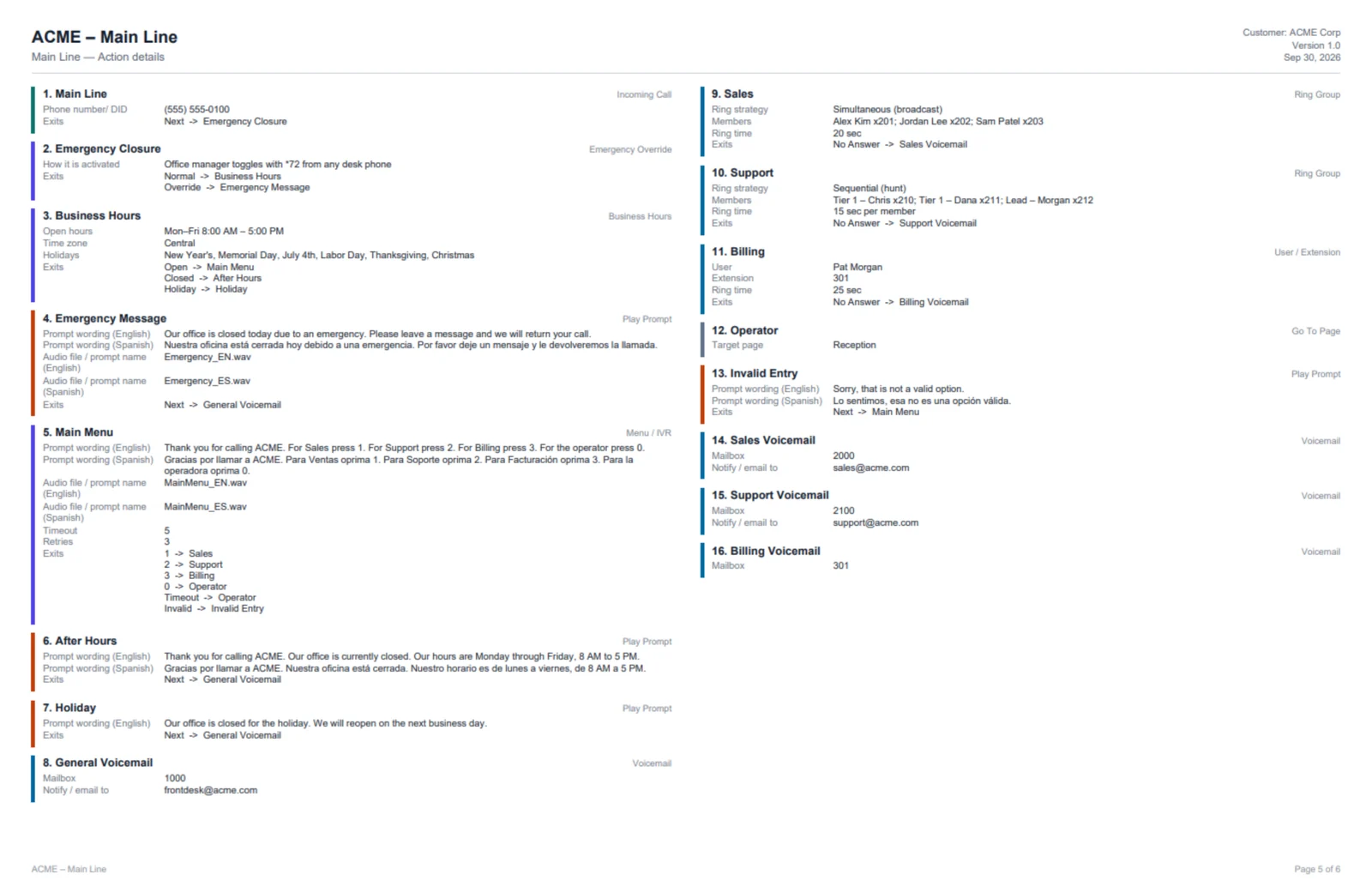
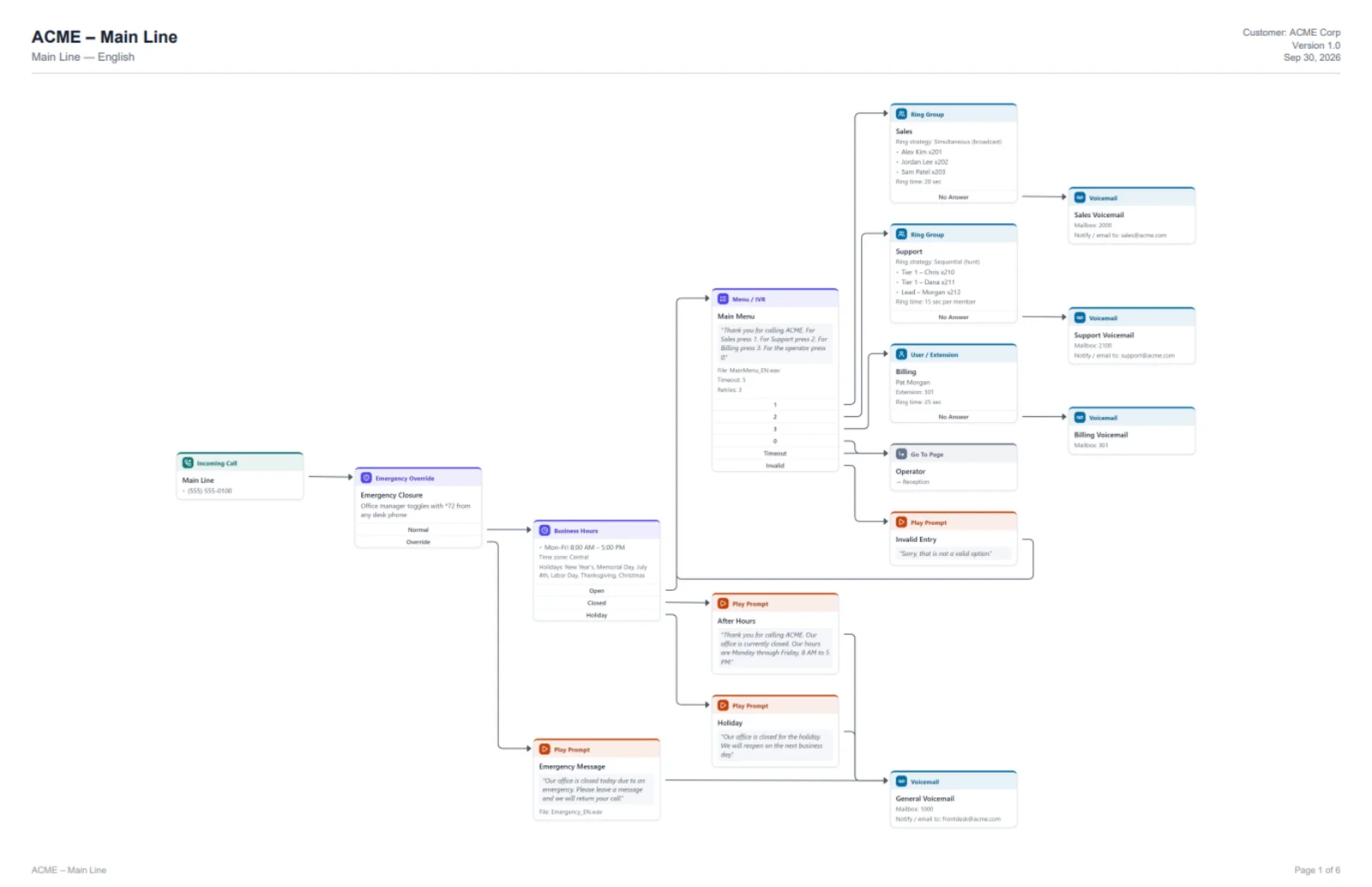
Real pages from a PDF export, unedited. Every page gets the title block, and the details pages spell out what the diagram can't: exact wording in each language, members, extensions and where every exit goes.

Exported diagram page for ACME Main Line: incoming call, emergency override, business hours, a main menu to sales and support ring groups, billing, operator and voicemail, with a title block showing customer, version and date.
The diagram One page per flow, laid out left to right.
Exported details page listing each step with its prompt wording in English and Spanish, audio files, ring group members, extensions, mailboxes and where every exit goes.
The details A written spec of every step, ready for whoever builds or supports it.

Your call flows never leave your computer.

Call flows contain customer names, phone numbers, extensions and internal routing. So we built the editor to run entirely in your browser. We never receive, store or see your flows.

Nothing uploaded

Designing, auto-layout and PDF export all happen on your machine. There's no cloud copy to leak.

You own the files

Save flows as files wherever your company requires: your laptop, a network share, SharePoint or a ticket.

Verifiable

No analytics or tracking scripts. A strict browser policy blocks the page from sending data anywhere. Read the details →

Stop drawing call flows in a tool that wasn't built for them

Visio is a general-purpose drawing program, so every call flow means hours of placing boxes and dragging connectors. CallSketch already knows what a call flow is: menus, hours, ring groups, queues. You document it in minutes and get back to the real work.

1

Real telephony building blocks

Menus, business hours, holidays, ring groups (broadcast, hunt, round robin), shared lines, voicemail, queues, callbacks and more.

⇢

Drag an exit, pick the next step

Every step comes with its real exits (1, 2, Timeout, No Answer). Drag from one, type “voicemail” and it's connected.

⌘

Auto-arrange

One click lays out the whole flow cleanly. No more nudging lines around after every change.

PDF

Client-ready PDFs

Title block, one diagram per page, and a written spec of every prompt, member and route. Letter to 11×17.

⧉

Multi-page flows

Keep the main line on one page and department details on others, linked with Go To steps.

★

Templates

Start from a main-line or contact-center template instead of a blank page.

Why not just use Visio or draw.io?

They draw boxes and arrows. CallSketch knows how calls actually route, so a call flow is faster to build, harder to get wrong and easier for anyone to read.

Visio / draw.ioCallSketch
Building blocksGeneric boxes and diamonds you label by handReal call flow steps: menus, business hours and holidays, ring groups (broadcast, hunt, round robin), queues, callbacks and voicemail
RoutingArrows you draw and keep attachedEvery step has its real exits (1, 2, Timeout, Invalid, No Answer): drag one and type the next step
LayoutNudge boxes and reroute lines after every changeOne click lays out the whole flow, left to right
MistakesNothing tells you a menu option goes nowhereCheck flags exits that go nowhere, steps nothing reaches and missing prompts
Prompts & languagesText boxes, retyped for each languagePrompt wording and audio file on each step, in every language, switched with one click
Large systemsOne huge page, or copies that drift apartMulti-page flows linked with Go To steps
The handoffA separate document for the prompts and routingA PDF with a title block, the diagram and a written spec of every prompt, member and route
Starting pointA blank canvasMain line and contact center templates

Importing Visio or draw.io files isn't supported; starting from a template is the quickest way to redraw an existing flow.

Simple pricing

Every plan starts with a 7-day free trial. No credit card required. Trial exports are watermarked. Prices in USD, plus applicable tax.

Teams

Coming soon
For MSPs, VARs and consulting firms
  • Per-seat billing on one invoice
  • Shared company templates
  • Company logo on every PDF
Contact us
+

Two products, one subscription

Every plan includes CallSketch for call flows and IVR diagrams and NetworkSketch for network diagrams. Sign in to either with the same email. No second bill.

See NetworkSketch

Questions

Where are my call flows stored?

Only on your computer. Flows are saved as files where you choose, and optionally auto-saved in your own browser so an accidentally closed tab doesn't lose work. You can turn that off. Our servers never receive them.

What do you store about me?

Your email address, your sign-in sessions and your subscription status. Payments are handled by Stripe; we never see your card number. Full details.

Does it work with my phone system?

It's vendor-neutral: use it to document CXone, Genesys, Five9, Amazon Connect, RingCentral, Teams, 3CX, FreePBX, or anything else with menus and routing. It's a drawing and documentation tool, not a connector: it doesn't log in to, read from or change your phone system. You enter the flow (from a template, it goes quickly) and CallSketch lays it out and documents it. Start from the templates, or see contact center call flows.

Can I try it without signing up?

Yes. Open the editor and build a flow right away; nothing to install. Saving files and exporting PDFs need the free 7-day trial (just your email, no credit card), and what you built is still there after you sign in on the same computer.

What happens to my files if I stop paying?

They're yours. Each flow is a plain JSON file (.callflow.json) on your computer, readable in any text editor, and every PDF you exported stays yours too. After the trial or a cancellation, opening them in the editor needs a subscription again.

Are there keyboard shortcuts?

Ctrl+Z / Ctrl+Y undo and redo, Ctrl+C / Ctrl+V / Ctrl+D copy, paste and duplicate, Delete removes, Ctrl+S saves, and Shift+drag selects several steps. Double-click the canvas to add a step there, or drag from any exit and type the next step's name.

Can I share a login with my team?

No. Each subscription is for one person and can be signed in on up to two devices at a time, such as a work PC and a laptop; signing in on a third signs out the oldest. Team plans are coming soon.

Who builds it

CallSketch is built by a working telecom and contact center engineer who documents call flows for a living and got tired of fighting Visio to do it. It's a small, independent product: write to support@callsketch.com and the person who builds it reads and answers. See what's new.

Free tools

No signup, and they run in your browser: nothing you type is uploaded.

Also from us

NetworkSketch: network diagrams with media types, port labels, IP checks and a PDF title block. Included with every CallSketch plan.