Contact center call flows

Contact center call flows, documented outside the admin console.

The routing script in your contact center platform is hard to review and impossible to hand to a business owner. Lay the same logic out as a clear diagram: hours, the IVR, skill queues, agent availability checks, queue position and wait time, callback offers, hold loops and overflow, with every prompt written out.

On your phone? The editor is made for a computer. Email yourself a link and open the template at your desk. Email me a link for my computer
Opens the real editor in your browser. No account needed to look around; the free trial (no credit card) adds saving and export.
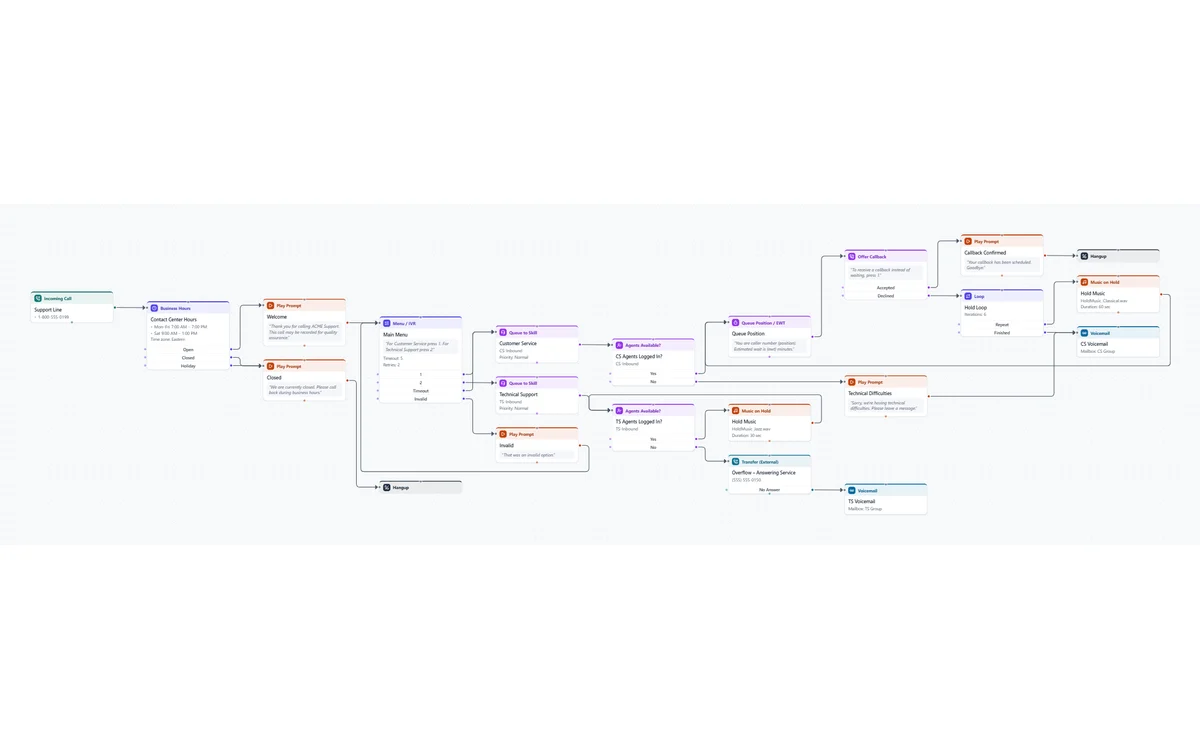
The Contact Center Queue template: hours check, welcome, main menu, Customer Service and Technical Support queues with agent checks, queue position, callback offer, hold loop and overflow to an answering service

What's in the Contact Center Queue template

Two skill queues behind an IVR, with the checks and fallbacks a real contact center needs.

Hours and IVR

Open, closed and holiday routing, a welcome prompt and a menu sending callers to Customer Service or Technical Support.

Agent checks

Each queue first checks that agents are logged in. If none are, Customer Service plays a technical difficulties message and takes a voicemail.

Queue experience

Queue position and estimated wait, an offer to call back instead of holding, and a hold loop with music.

Overflow

With no Technical Support agents logged in, calls go to an outside answering service, then to voicemail if it doesn't answer.

Why document it outside the platform

Reviewable by non-admins

Business owners, supervisors and auditors can follow a diagram. Very few can follow a routing script or a studio canvas.

Design before you build

Agree the flow with the customer first, then build it in the platform once, instead of rebuilding after every review.

Contact center steps built in

Queue to skill, agents available, queue position and EWT, callback offers, post-call surveys, data dips, variables, conditions and case branches.

Every prompt written out

Each step holds the caller-facing wording and the audio file, in as many languages as you need, ready for prompt recording.

Platform-neutral

The same diagram works whether the flow ends up in CXone Studio, Genesys Architect, Five9, Amazon Connect or a PBX. Moving platforms? Document the old flow once and rebuild from it.

A handoff PDF

A title block, one diagram per page, and a written spec of every prompt, queue and route for the customer's records.

Questions

Does it connect to CXone, Genesys or Five9?

No. It's a documentation and design tool, not a connector: it never logs in to, reads from or changes your contact center platform. You draw the flow (a template gets you most of the way) and it lays it out and documents it.

Can it show a big flow across several pages?

Yes. Keep the main routing on one page and each queue or department on its own, linked with Go To steps so readers can follow the call.

Where are my call flows stored?

Only on your computer, as files you save. Our servers never receive your call flows, prompt wording or phone numbers.

What does it cost?

Trying the editor is free with no account. The free trial runs 7 days with every feature. After that it's $9 a month billed yearly, or $15 month to month. Pricing.

See the Contact Center template in your browser.

No signup to look around. Rename the queues, add your own steps, and start the trial when you want the PDF.

Open the template