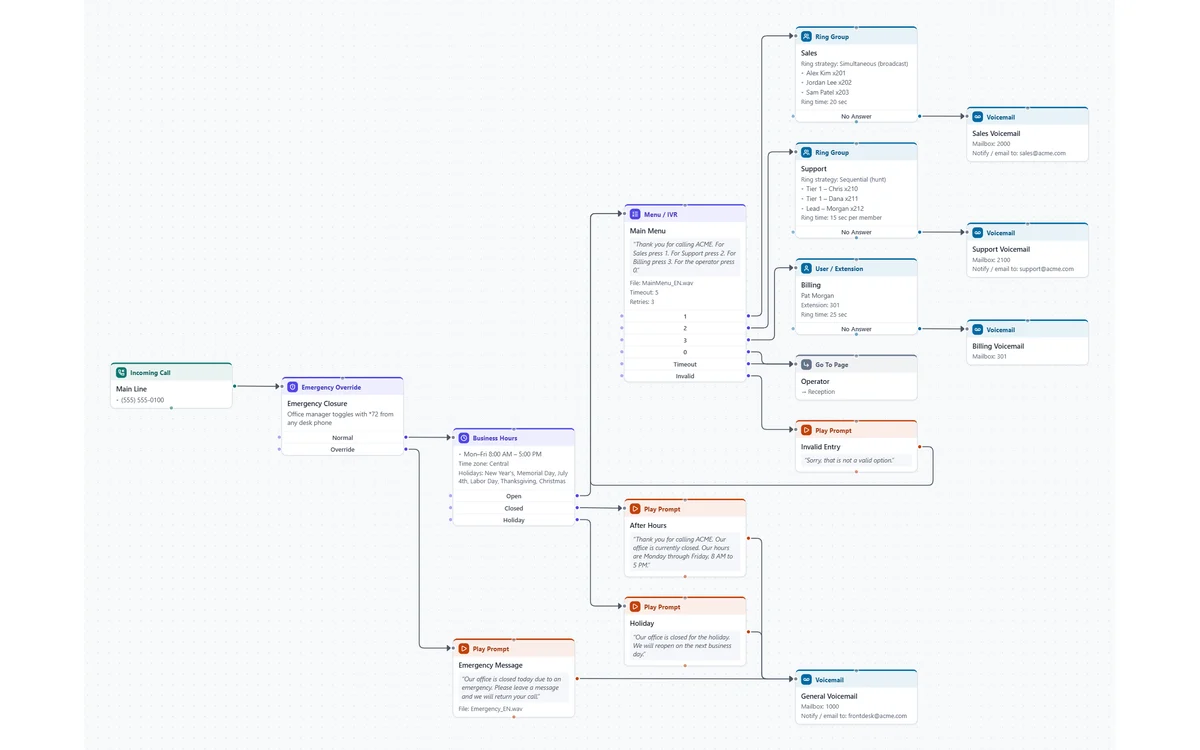
Map an auto attendant the way it really routes: the number that rings in, the holiday and business hours check, the menu and every option, timeout and invalid entry, the ring groups, extensions and voicemail behind them. Each step holds its prompt wording and audio file, and the PDF spells out every route.
A typical small-business main number you can rename and reshape in a few minutes.
An emergency closure override, then business hours with time zone and holidays, each with its own message.
Press 1 for Sales, 2 for Support, 3 for Billing and 0 for the operator, with timeout, retries and an invalid-entry prompt.
A broadcast ring group, a sequential hunt group, a direct extension, and voicemail boxes with email notification.
The operator's shared line lives on its own page, linked with a Go To step, and prompts are written in English and Spanish.
Menus, business hours, emergency overrides, ring groups, shared lines, dial by name, voicemail, external transfers, conditions, data dips and variables.
Every option (1, 2, Timeout, No Answer…) is its own exit. Drag from it, choose the next step, and it's added and connected in one go.
Each step keeps what the caller hears and the audio file name, so the diagram doubles as the script for recording prompts.
Write prompts in several languages and switch the whole diagram between them. Check flags any step still missing a translation.
Check finds exits that go nowhere and steps nothing reaches, before the customer finds them by calling.
A title block, one diagram per page, and a written spec of every prompt, member and route, from Letter to 11×17.
Any of them. It's vendor-neutral, so you can document RingCentral, Teams, 3CX, FreePBX, Cisco, Avaya, Mitel or anything else with menus and routing. It's a documentation tool, not a connector: it never logs in to or changes your phone system.
Yes. Queues, agent availability checks, queue position and wait time, callback offers and surveys are built in. More about contact center call flows.
That's what the PDF is for: a title block with customer and version, the diagram, and a written spec of every prompt and route. During the free trial, exports are watermarked.
Trying the editor is free with no account. The free trial runs 7 days with every feature. After that it's $9 a month billed yearly, or $15 month to month, and it includes NetworkSketch for network diagrams. Pricing.
No signup to look around. Change the menu options, add your ring groups, and start the trial when you want the PDF.
Open the template